The settings window
Choose extra -> Settings to open the settings window
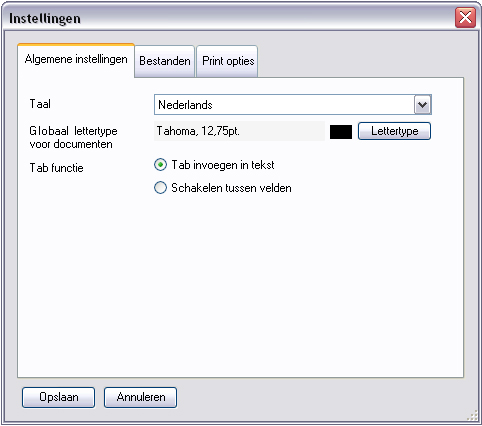
Tabpage: General settings
- Language: The application's language.
- Global font for documents: The default font for fields of new documenttypes. This setting does not affect existing documenttypes or documents. (Also see: Default fonts)
- Tab behavior: The action that will be executed when the keyboard TAB key is pressed:
- Insert tab in text: A tab (tabulator space) is inserted in the text of the text input field.
- Switch between fields: The input cursor is moved to the next text input field
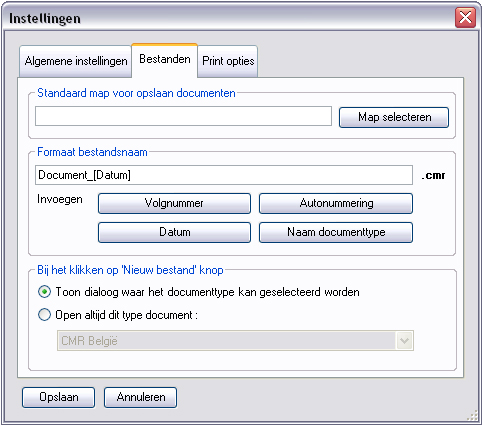
Tabpage: Files
- Default folder for saving files : Here you can specify a folder which will be used as the proposed location when you save a new file. Per documenttype another "default folder for saving files" can be specified, which will override this global setting.
- Filename format : The default filename format for new files. You can insert your own fixed text, and/or use the 4 possible built-in parameters:
- Sequence nr. : A number that will be automatically incremented when a file with the same name exists in the folder where you save the file.
eg.: Document_[Sequence nr.].cmr
Results in:
Document_1.cmr
Document_2.cmr
Document_3.cmr
- Autonumber : The current autonumber of the current document.
eg.: Document_[Autonumber].cmr
Geeft resultaat:
Document_6251.cmr
Document_6252.cmr
Document_6253.cmr
- Name documenttype : The name of the documenttype.
eg.: Document_[Name documenttype].cmr
Geeft resultaat:
Document_CMR-NL.cmr
Document_Pakbon1.cmr
Document_DGD.cmr
- When clicking on the 'new file' button : Specifies the action that will be executed when you click the "New file" button.
- Show document selection dialog : A dialog window will be shown where you can select the documenttype you want to create.
- Always open this type of document : No dialog is shown, but a new file is directly created instead.
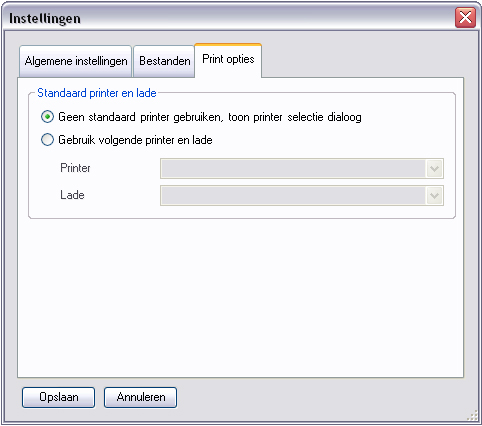
Tabpage Print options
Default printer and tray:
- Don't use a default printer, show printer selection dialog: When clicking on the "Print" button, a window will be shown where you can select a printer
- Use following printer and tray: When clicking on the "Prnt" button, the document will be directly printed on the specified printer, without showing a printer selection dialog. Per documenttype, a different default printer can be selected, which will override this global setting.
|